security
- Done
Distributed Denial of Service (DDoS)
Concepts
- Attacks designed to overload websites
- Compete against legitimate connections
- Distributed - hard to block individual IPs/ranges
- Often involve large armies of compromised machines - botnets
Categories
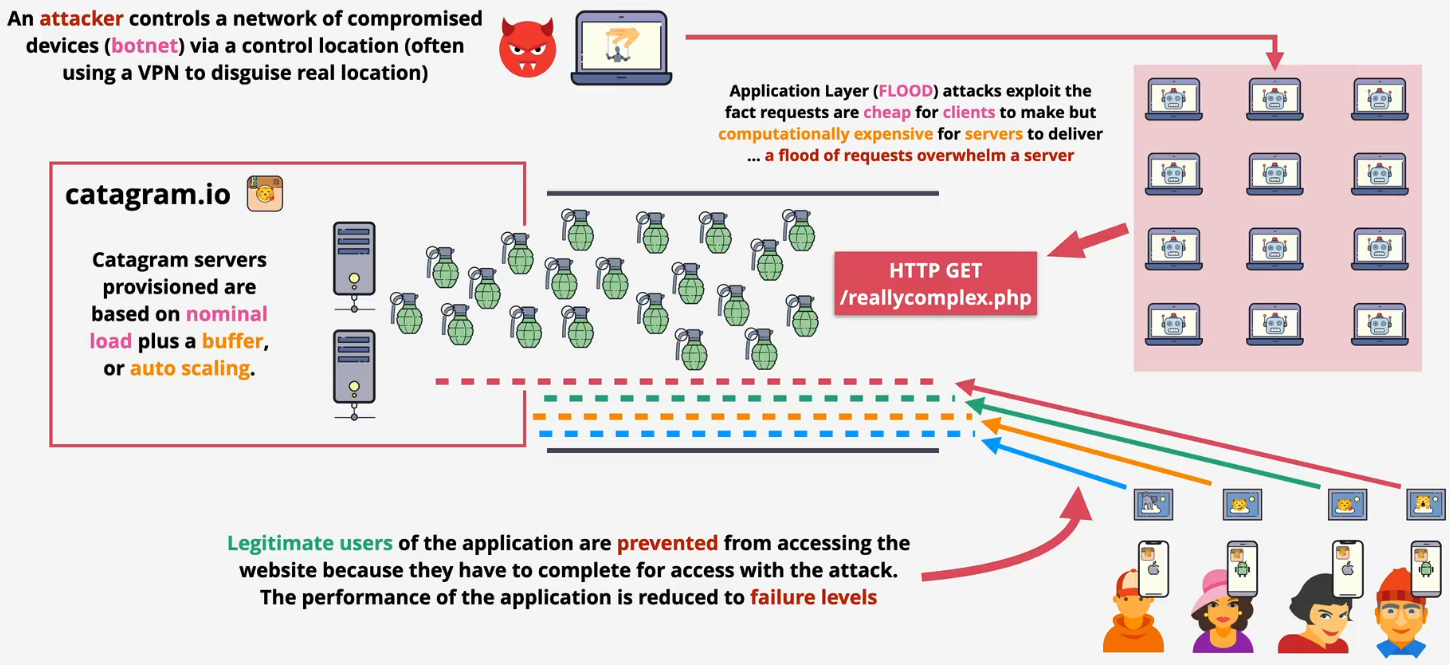
- Application layer - HTTP flood
- Sending a massive number of seemingly legitimate requests, such as repeated asking for a webpage or trying to log in
- The goal is to exhaust the server's resources (like CPU and memory), causing it to crash or become too slow to server actual users
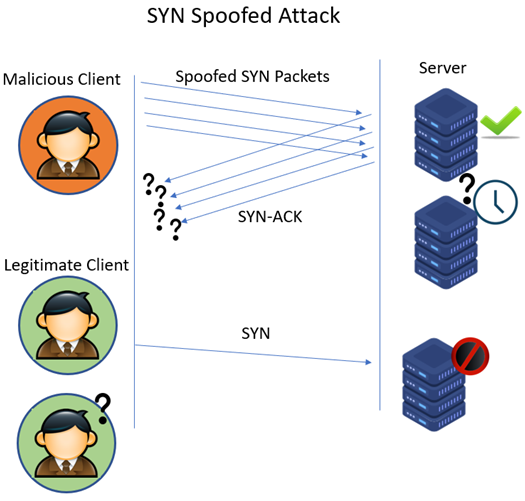
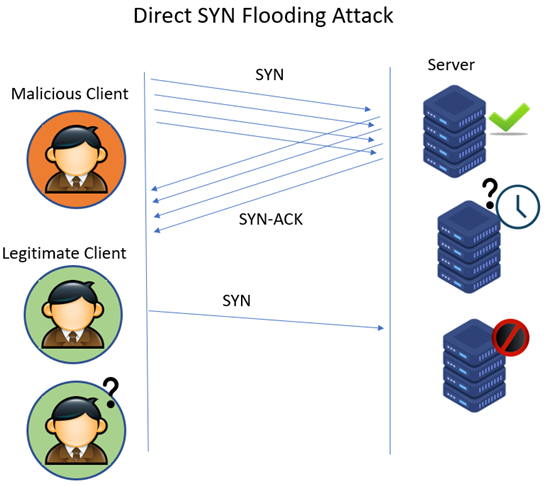
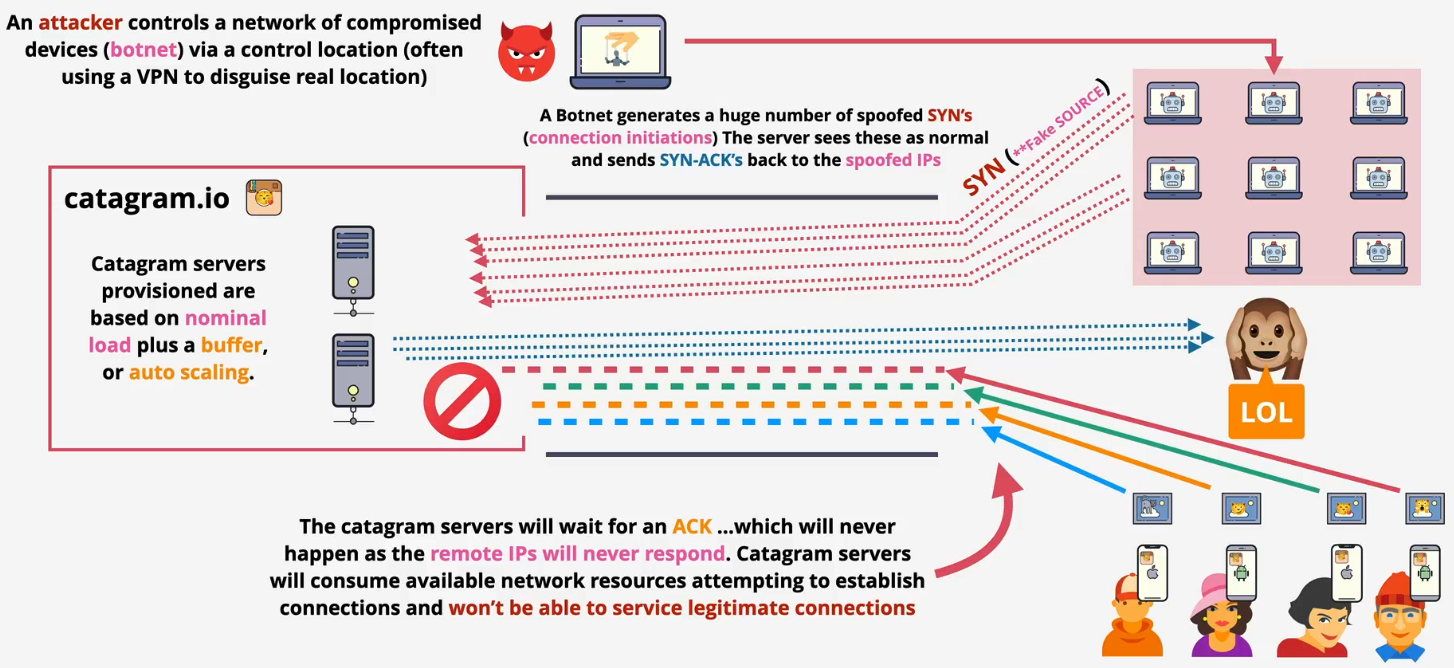
- Protocol attack - SNYK flood
- Sending a flood of "SNY" requests to a server to initiate a connection but never completes the process. The server is left waiting for a response that never arrives
- Eventually, the server runs out of available spots to hold for new connections and legitimate users are blocked from connecting
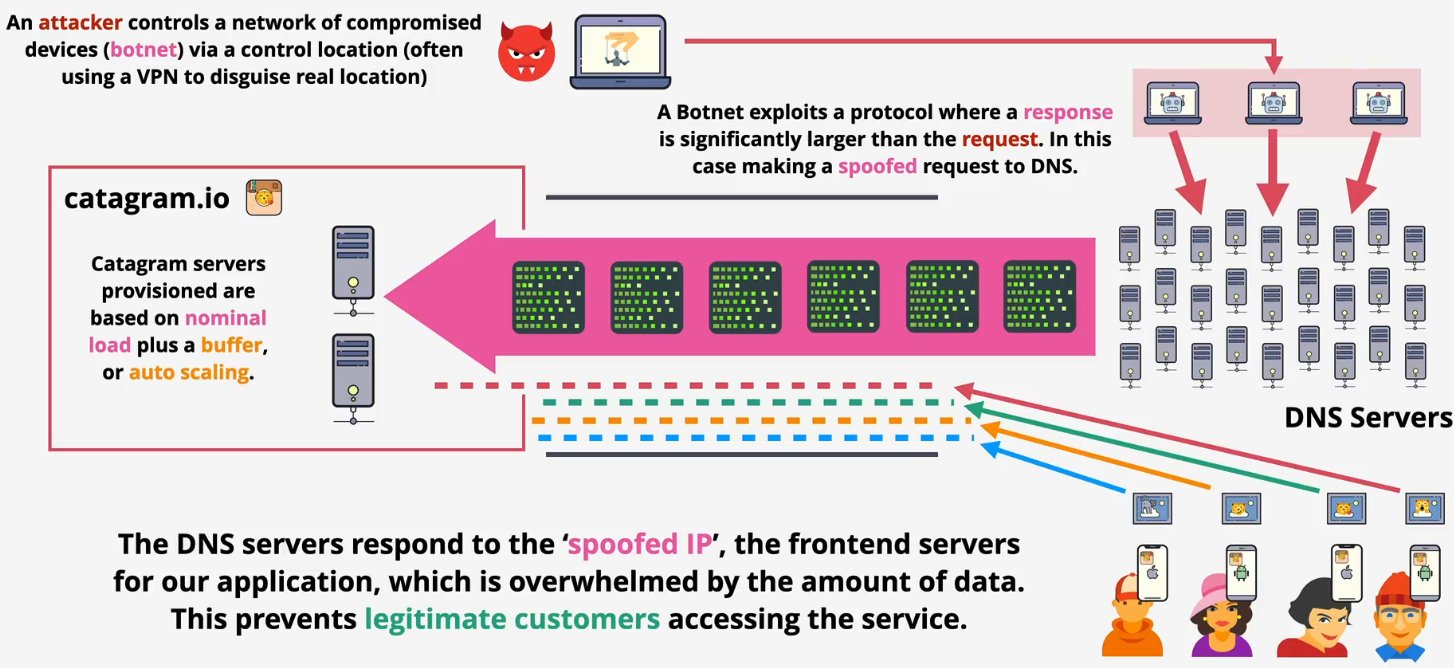
- Volumetric - DNS amplification
- Sending small requests to public DNS servers but spoofs the return address to be the victim's IP address
Scenarios
- Normal

- Application layer
- Protocol attack
- Volumetric
SSL and TLS - Later 40
Concepts
- SSL - Secure Sockets Layer and TLS - Transport Layer Security
- TLS is a newer and more secure version of SSL
- Provide privacy and data integrity between client and server
- Privacy: Communications are encrypted. It could be asymmetric and then symmetric
- Identity (server of client/server) verified
- Reliable connection: Protect against alteration
Architecture
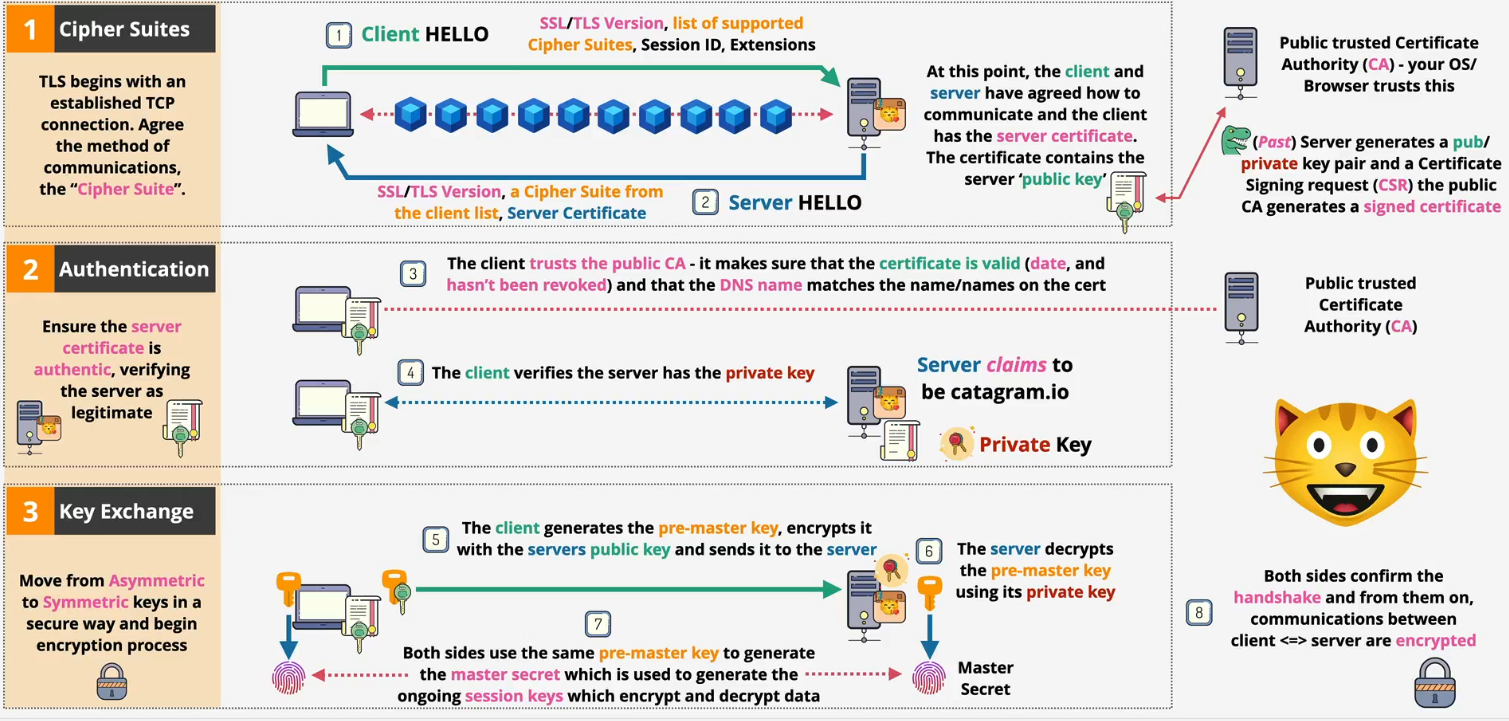
- Server certificate issuance flow
- Generate a key pair: The server owner creates a public key (which will be shared) and a private key (which is kept secret)
- Create a CSR: They create a Certificate Signing Request (CSR). This is essentially an application form that includes the public key and identifying information (like the domain name)
- Submit to the CA: The CSR is sent to a trusted Certificate Authority (CA)
- CA verifies ownership: The CA performs validation to ensure the applicant actually owns the domain they're requesting the certificate for
- CA signs and issues the certificate: Once verified, the CA uses its own private key to digitally sign the CSR. This act of signing officially creates the SSL certificate
- Certificate is returned: The final, signed certificate—which now contains the server's public key and the CA's trusted signature—is sent back to the owner
- Install on server: The owner installs this new certificate and their original private key on the web server, making it ready to accept secure connections
- Phase 3: Exchange
- The client generates a pre-master secret and encrypts it using the server's public key
- The server decrypts the encrypted pre-master secret using its private key
- Both sides use the shared pre-master secret to generate a master secret. This is then used to create the session keys, which encrypt and decrypt all application data (like your browsing activity) for the rest of the session
Hashing - Later 41
Concepts
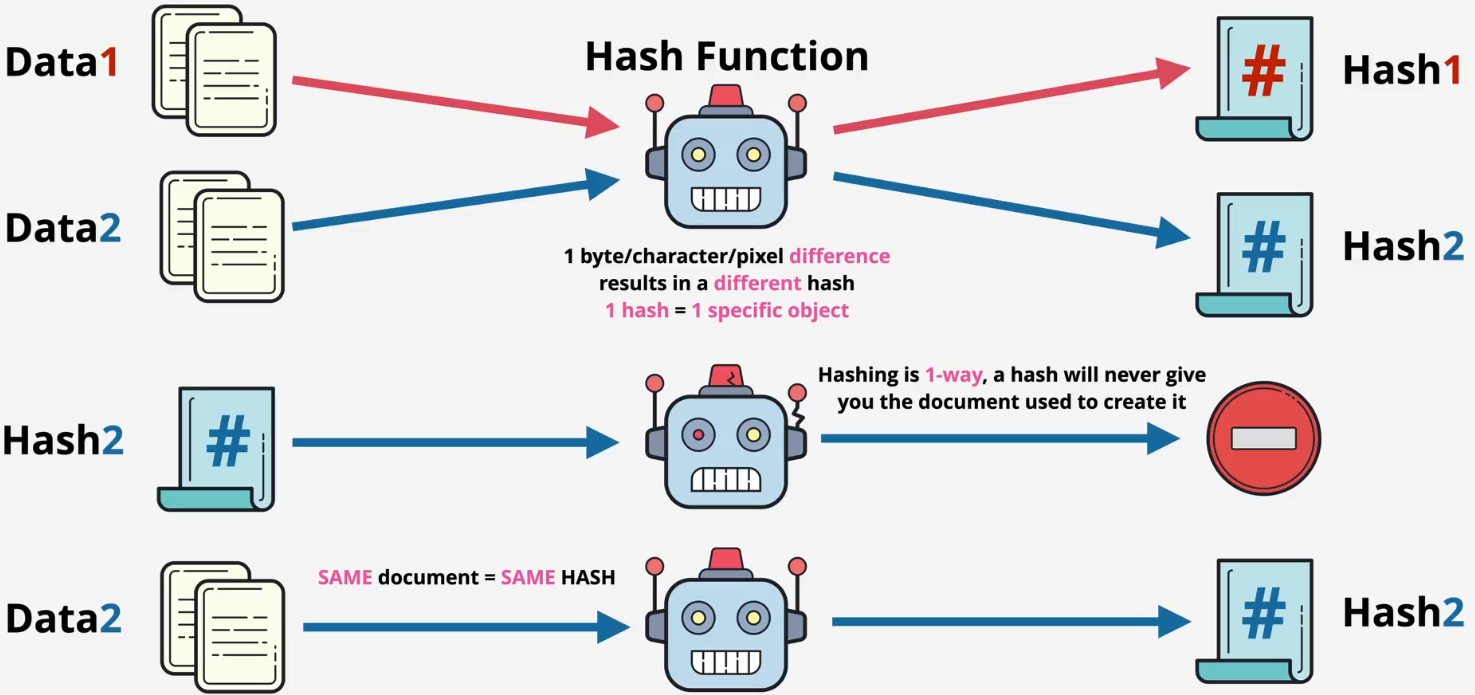
- Data + Hashing function → Hash
- You cannot get the original data from a hash
- Same data = same hash
- Different data = different hash
- Downloaded data can be verified by using hash
- You can take data, hash it, and compare the hashesfa
- If so, the downloaded data is unaltered
How it works?
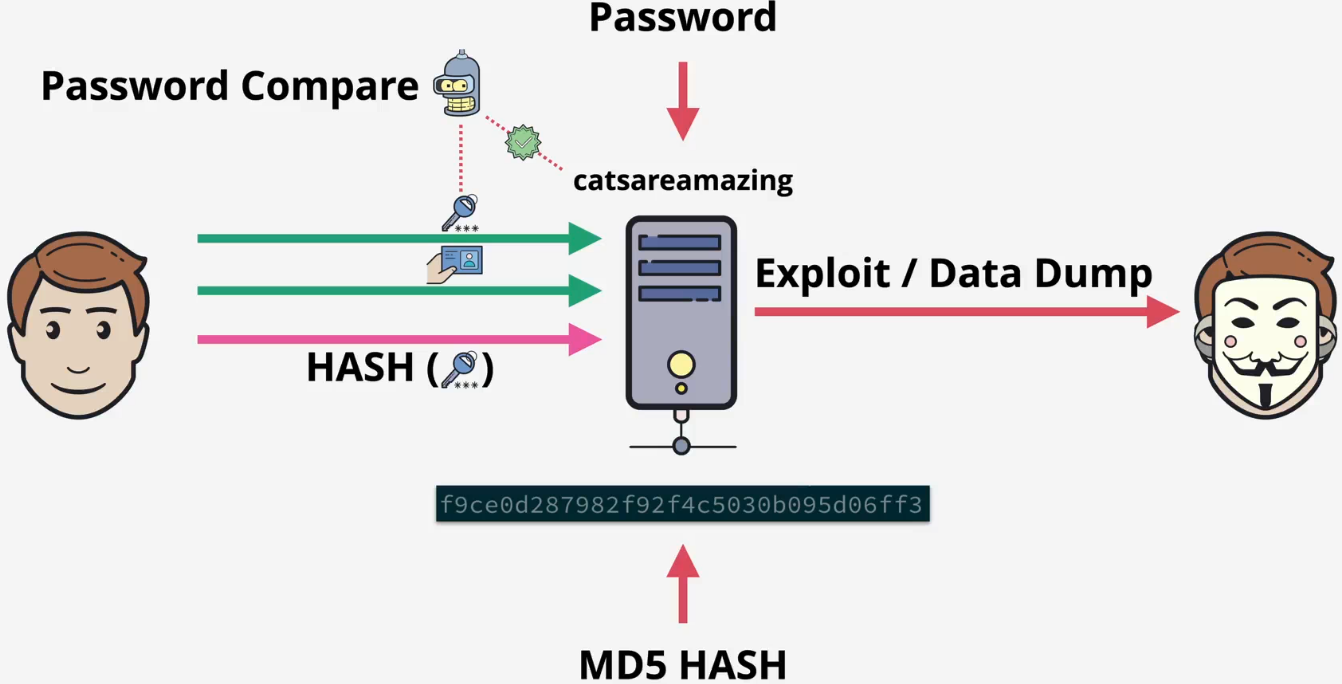
- When you create an account
- The server takes your password
- It scrambles it into a unique code called a hash using a special function
- Crucially, it only saves this hash, not your actual password
- When you log in
- You enter the password
- The server takes what you just typed and scrambles it into a new hash using the exact same function
- It then compares the new hash to the hash it has stored
- The result
- If the two hashes match, you are logged in
- If they do not match, access is denied
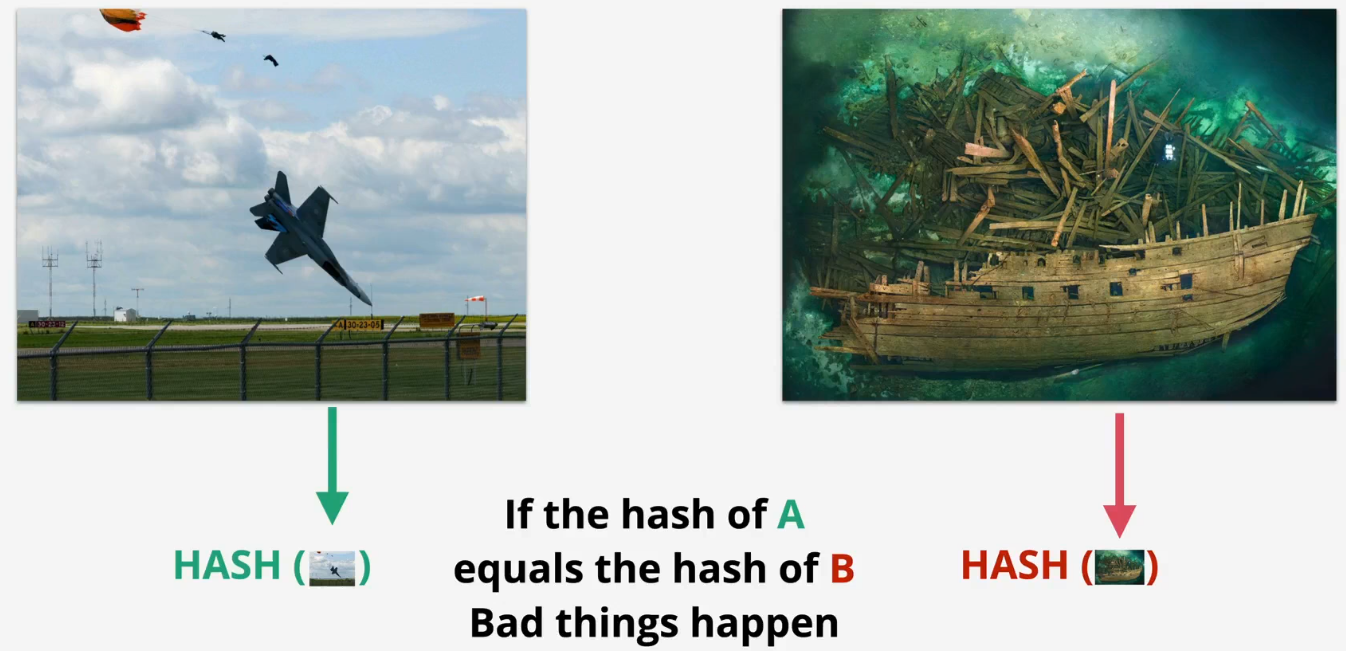
Weakness - collision
ls
plane.jpg ship.jpg

md5 plane.jpg
MD5 (plane.jpg) = 253dd04e87492e4fc3471de5e776bc3d

md5 plane.jpg
MD5 (plane.jpg) = 253dd04e87492e4fc3471de5e776bc3d

md5 ship.jpg
MD5 (ship.jpg) = 253dd04e87492e4fc3471de5e776bc3d

shasum -a 256 plane.jpg
91e34644af1e6c36166e1a69d915d8ed5dbb43ffd62435e70059bc76a742daa6  plane.jpg

shasum -a 256 ship.jpg
caf110e4aebe1fe7acef6da946a2bac9d51edcd47a987e311599c7c1c92e3abd  ship.jpg
Digital Signatures - Not yet for econcepts only
Concepts
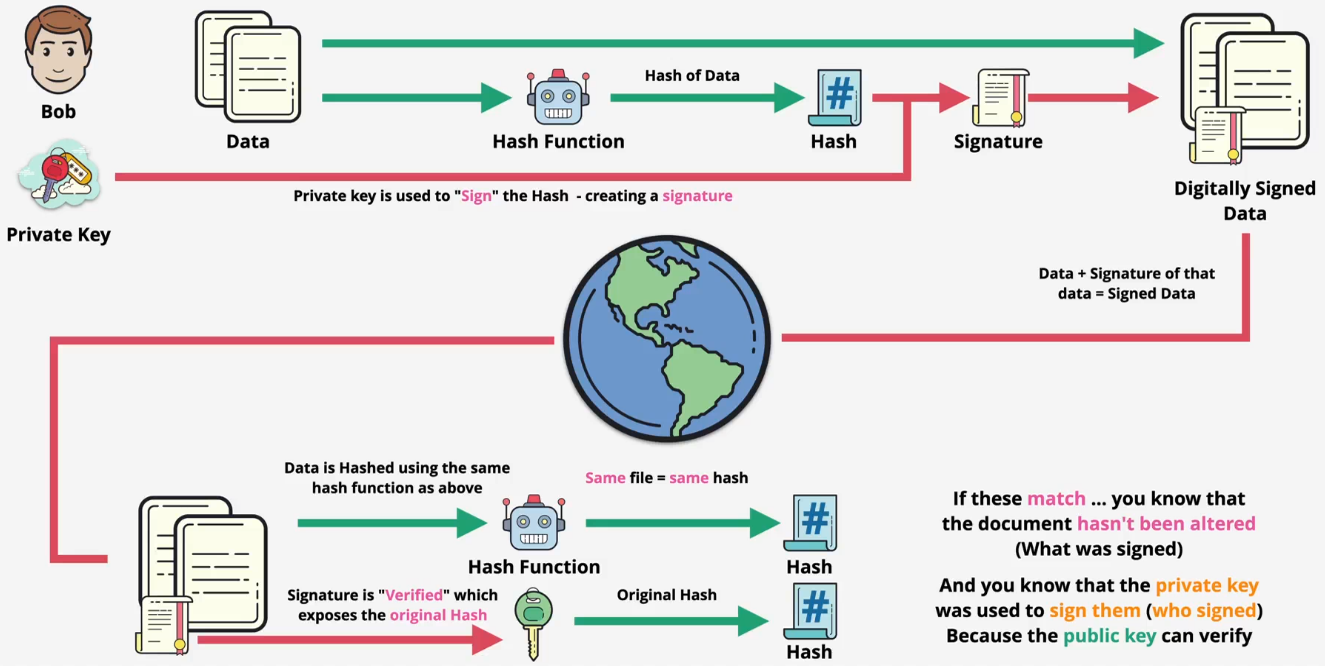
- Verifies integrity (what) and authenticity (who)
- Hash of the data is taken, original data remains unaltered (integrity)
- Th
Examples
- Bob generates his keys
# Private key
openssl genpkey -algorithm RSA -out bob_private.key

# Public key
openssl pkey -in bob_private.key -pubout -out bob_public.key
- Bob creates the document
# Create the document
echo -n "This is the original contract for Alice." > contract.txt
- Bob signs the document
- Step 1: It computes its SHA-256 hash you just saw
- Step 2: It signs that hash using private key
# View the document's hash
openssl dgst -sha256 contract.txt
--
SHA2-256(contract.txt)= 619792db98756329d996ae8d6b246b4268281277fe6da170ed24f7bbdb88fc86

# Sign the document's hash using private key
openssl dgst -sha256 -sign bob_private.key -out contract.signature contract.txt
- Bob sends the original document, the digital signature, and the the public key to Alice
- Alice verifies the document using the digital signature and Bob's public key
- Step 1: The public key's algorithm unlicks the signature to get the hash
- Step 2: The function will hash the original file
- Step 3: Compare two hashes
openssl dgst -sha256 -verify bob_public.key -signature contract.signature contract.txt
--
Verified OK
- What if the data is altered?
# Create a modified file
echo "This is the original contract for EVE." > contract_modified.txt

# Verify the modified file
openssl dgst -sha256 -verify bob_public.key -signature contract.signature contract_modified.txt
--
Verification failure
402773E06C710000:error:02000068:rsa routines:ossl_rsa_verify:bad signature:../crypto/rsa/rsa_sign.c:442:
402773E06C710000:error:1C880004:Provider routines:rsa_verify_directly:RSA lib:../providers/implementations/signature/rsa_sig.c:1041:
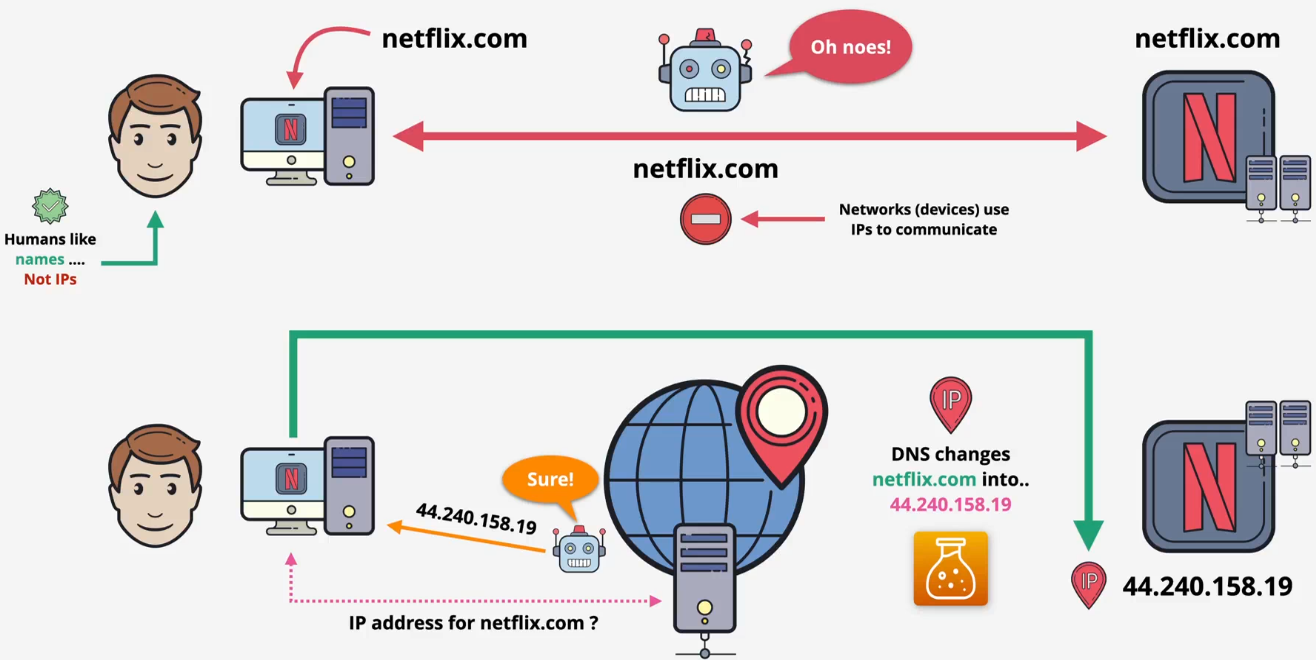
Domain Name System (DNS)
Basics - Done
Architectures - Done
Context: One server creates many issues

Terms
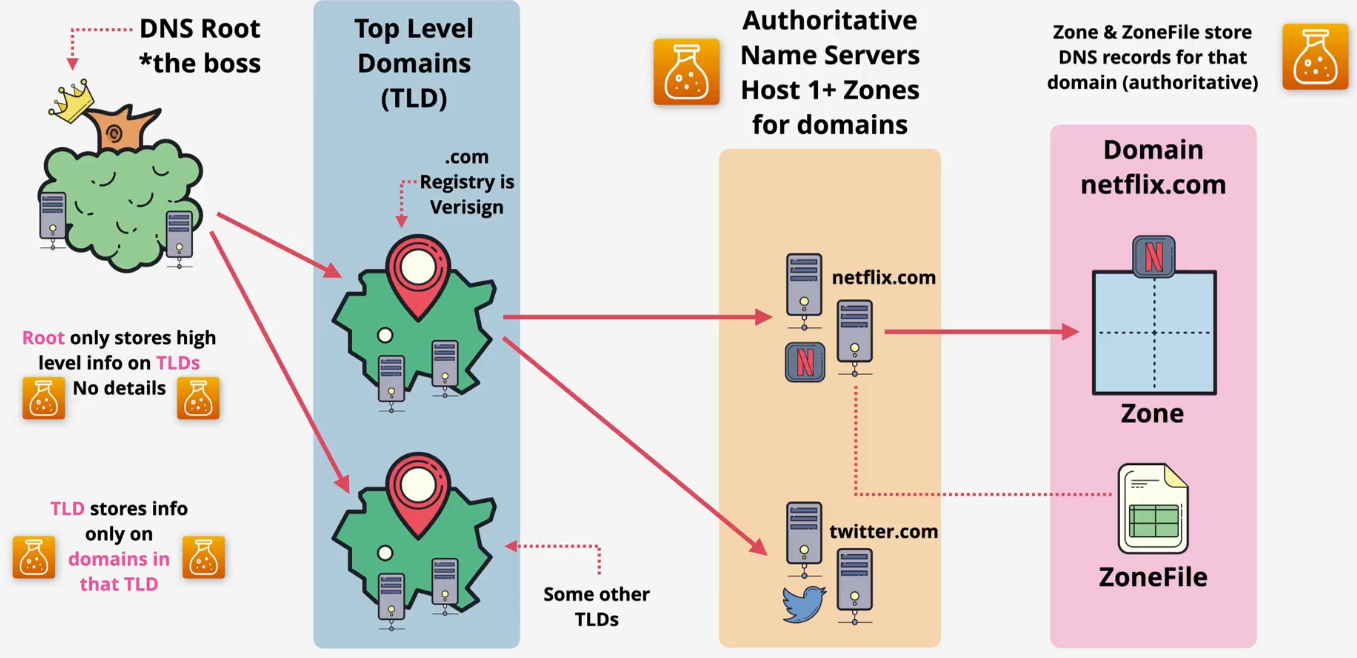
- DNS zone: A database (e.g., *.netflix.com) containing records
- Zonefile: The file storing the zone on disk
- Name Server (NS): A DNS server which hosts one or more zones and stores one or more zonefiles
- Authoritative contains real/genuine records
- Non-authoritative/cached: Copies of records/zones stored elsewhere to speed things up
Hierarchical design
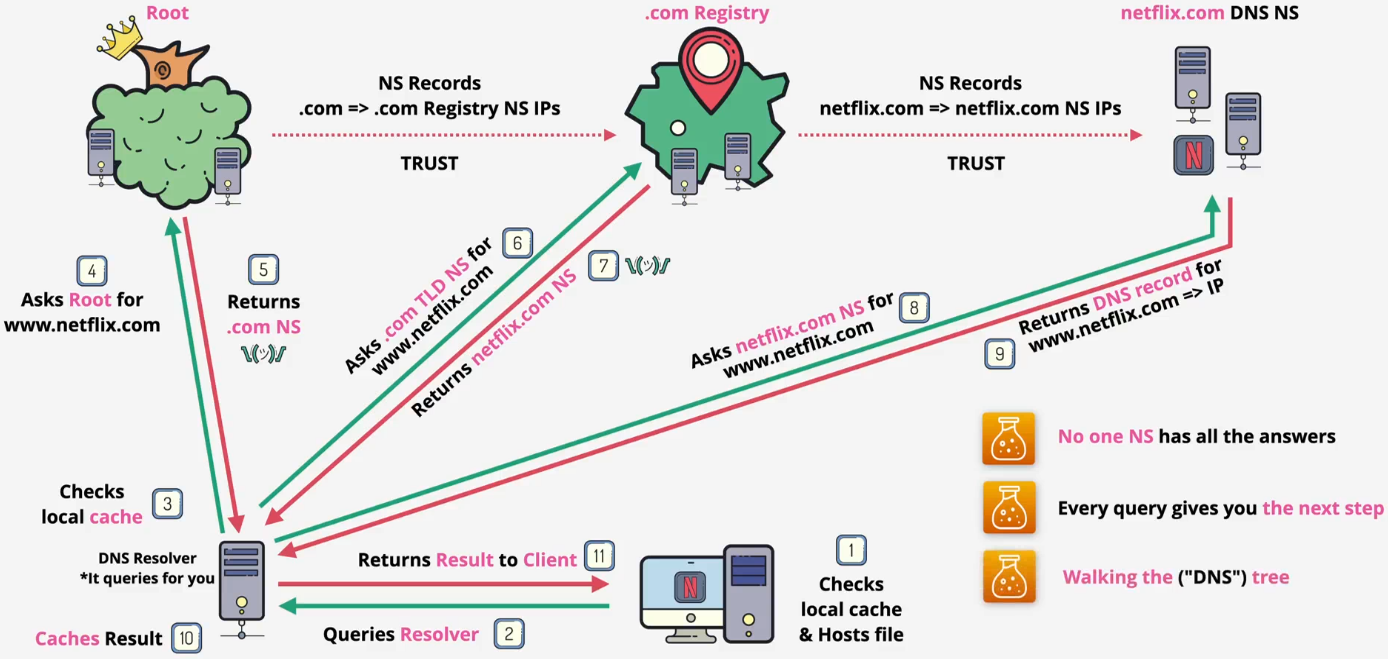
- The DNS root
- This is the root of the entire DNS system, which every DNS client knows about and trusts
- It is hosted on root servers
- There are 13 root server IP addresses
- These are operated by various independent organizations(like ICANN, NASA, etc.) to ensure the system is resilient
- The data inside the root zone is managed by IANA (Internet Assigned Numbers Authority)
- The root zone does not store much data. Its main job is to store the locations of the Top-Level Domain (TLD) servers
- Example: The root knows where to find the name servers for .com
- The TLD servers
- TLD stands for Top-Level Domain
- There are two main types
- Generic TLDs (gTLDs): like .com, .org, .net
- Country Code TLDs (ccTLDs): like .uk, .au
- IANA delegates the management of each TLD to a specific organization called a Registry. For instance, an organization called Verisign is the registry for .com
- The TLD zone does not contain specific records like
www.netflix.com - Its main job is to point to the name servers for a specific domain within its category
- Example: The .com TLD server knows where to find the name servers for netflix.com
- The Domain's Name servers
- The authoritative source of truth for a specific domain (like netflix.com)
- This is controlled by the domain owner (e.g., the IT team at Netflix)
- These name servers host the zone file for that domain
- This zone file is where the actual records are stored
- Example: The netflix.com name servers store the record for
www.netflix.comthat points to a specific IP address
- Flow summary: Root server knows where → .com server is, which knows where → netflix.com server is, which knows → the IP address for
www.netflix.com
Functions
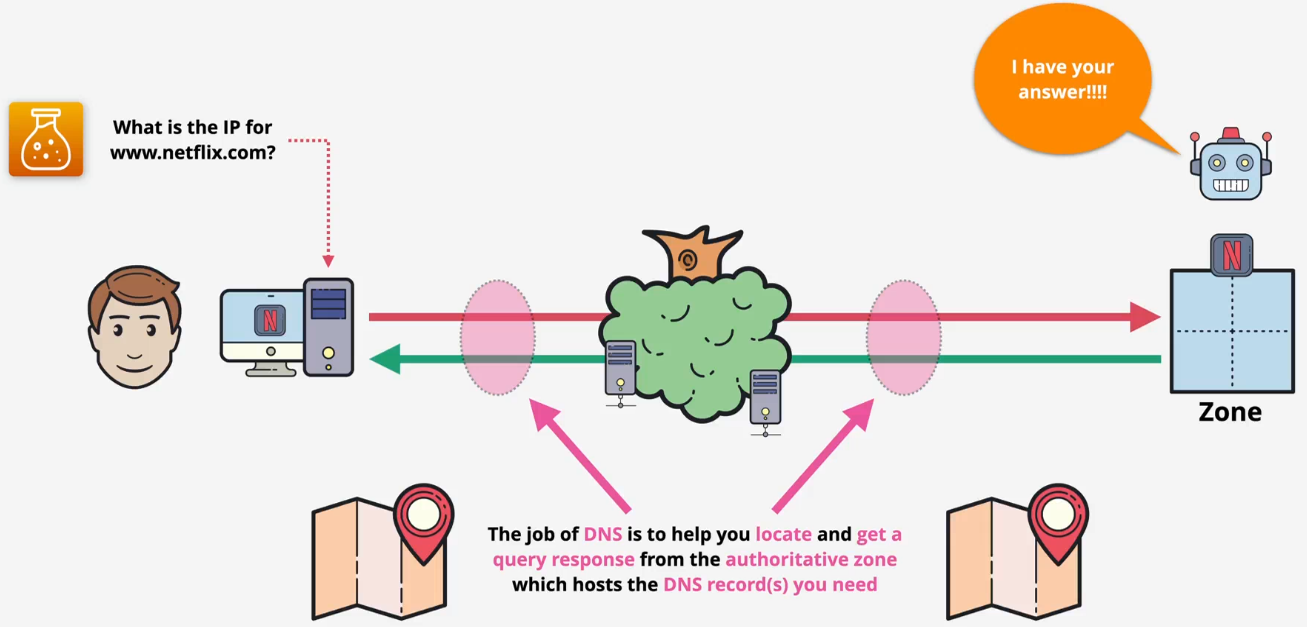
DNS query flow
- Checking flow
- The local machine
- Your computer first checks its own local files to see if it already knows the IP address
- It checks the hosts file, which is a static map
- It then checks its local DNS cache
- The DNS resolver
- If the answer is not found locally, your computer sends the query to a DNS resolver. This is usually your home router or your Internet Service Provider (ISP)
- The resolver also checks its own cache first. If another user recently asked for the same address, the resolver returns the cached (non-authoritative) answer immediately, and the process stops here
- The local machine
- Full query if there is no answer
- Root servers
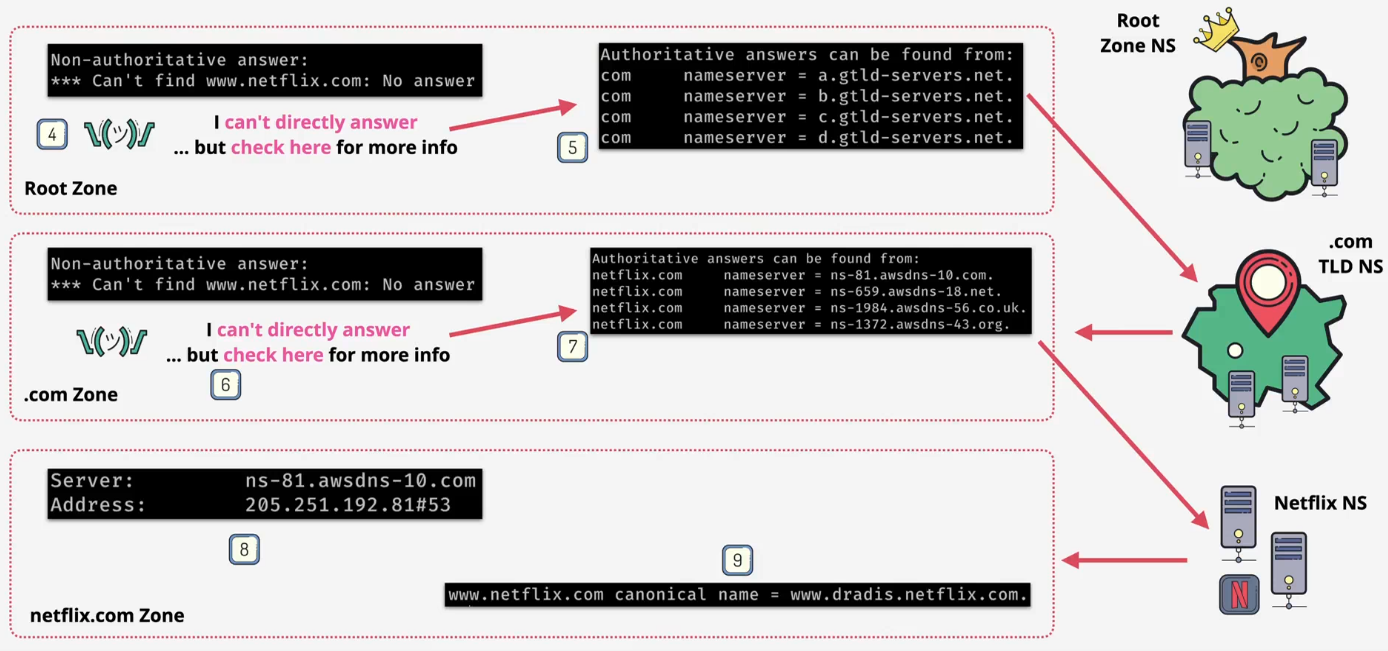
- The resolver queries a root server
- The root server doesn't know the IP for
www.netflix.com, but it knows where the .com servers are - Response: It replies with the addresses of the .com TLD name servers
- TLD servers (.com)
- The resolver then queries a .com TLD name Server
- The .com server doesn't know the final IP, but it knows which name servers are in charge of netflix.com
- Response: It replies with the addresses of the netflix.com name servers
- Authoritative server (netflix.com)
- The resolver queries one of the netflix.com name servers
- This server is authoritative for the netflix.com zone and hosts its zone file
- Response: It looks up the record for www and returns the final, authoritative answer (the IP address) back to the resolver
- Final
- The resolver caches the answer to speed up future requests
- It sends the final answer (the IP address) back to your computer
- Root servers